Real encounters.Real scores.Real evidence.
Faculty get the grading done: no transcribing, no hand-scoring. Record any conversation or video skill, and it’s scored against your rubric and mapped to the AACN Essentials and your syllabus. Faculty review every result and make the final call. Students get feedback in under a minute, scores go to your LMS gradebook, and every recording becomes evidence for your self-study.


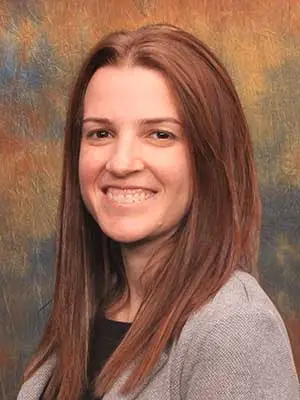
“Built by faculty, for faculty.”
I spent more than a decade in the ED at Long Island Jewish Medical Center, with patients in psychiatric crisis. Then I started teaching, and spent years crosswalking assignments to the AACN Essentials by hand and rebuilding the evidence for every self-study. So I built the tool I needed.
Competency-based nursing needs evidence, and today it runs on observation.
Observation is subjective.
Two faculty can watch the same student and score them differently. A rubric helps, but it gets applied from memory, in a hurry, to whatever the observer happened to see.
Observation is slow.
Watching an encounter or skill, transcribing it, scoring it against the rubric and writing feedback takes hours per student. Across a cohort, something gives: fewer encounters get assessed, or the feedback gets thinner.
Your self-study needs evidence.
The competency is in your curriculum map. The proof that students met it isn't anywhere you can point to.
Record. Score. Link.
Record
Students record on their phone or any device. Faculty can upload existing audio or video, and can watch the recording behind every score.
iOS · Android · WebScore
The audio or video is transcribed, student and speaker voices are separated, and it's scored against your rubric in under a minute. Faculty then review every score.
Diarization built inLink
Each score is mapped to the NCSBN CJMM, the AACN Essentials, then your program outcomes and course objectives, and it adds up to a cohort report you can export for your self-study.
PDF and CSV exportThe questions we hear most.
Faculty stay in charge
You review every score. Adjust any of them, and the change is logged. Use our rubric, or add your own criteria to be scored alongside it. The scoring does the first pass, and faculty make the call.
Video skills checklist
Watch the skill, not just the score. Upload a video of hand hygiene, vital signs, medication administration, a sterile field, or a Foley. Each checklist item is time-stamped, so you can jump straight to the moment you need. Teaching a skill that isn't on the list? Build your own checklist.
Feedback students can use
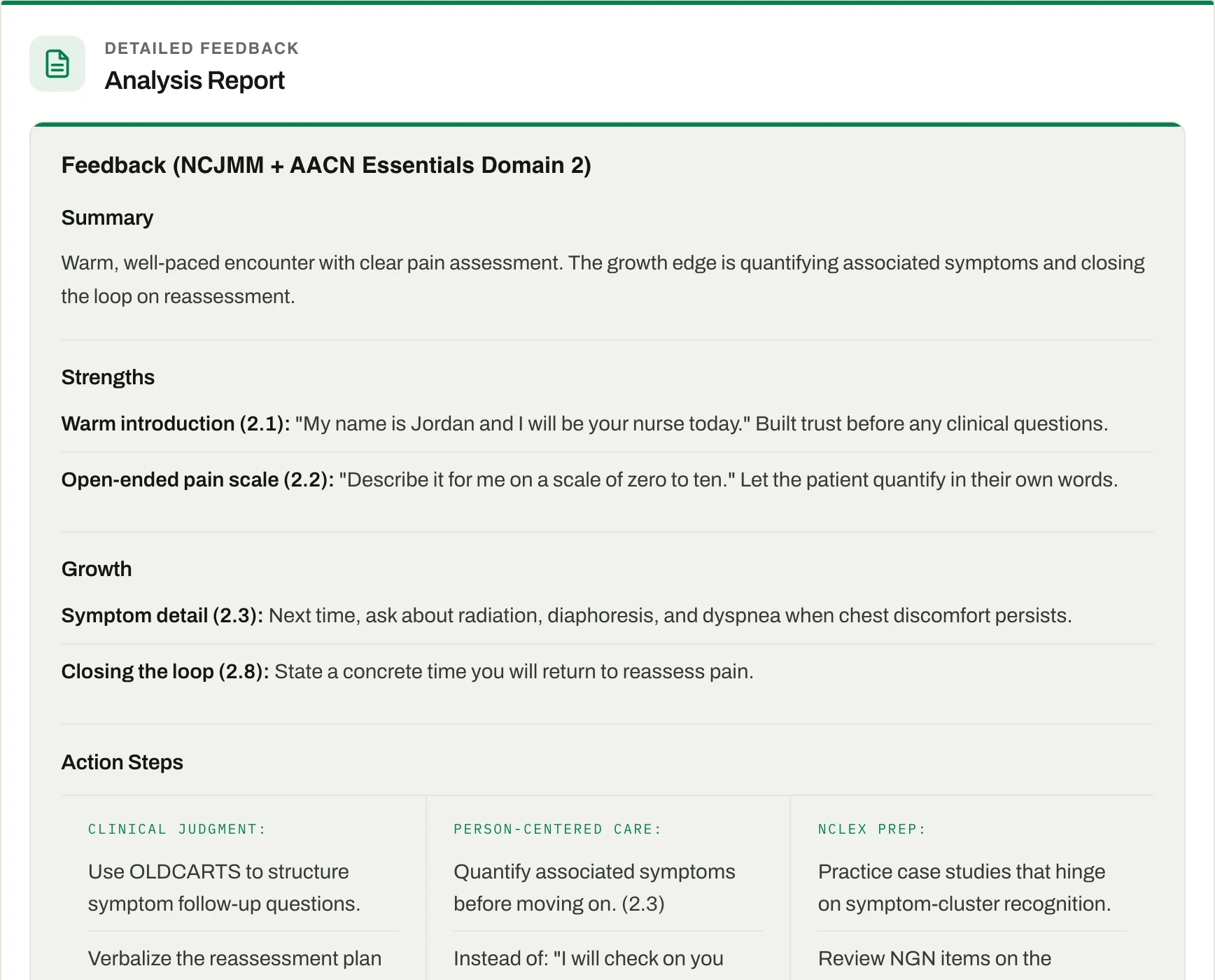
Every student gets a one-page report with what they said, what worked, and what to try instead. It arrives in under a minute, while the encounter is still fresh.
Works with your LMS
Canvas, Brightspace, Moodle, Schoology and Blackboard. Import a course and its roster, add NurseKind assignments from inside your LMS, and send scores to your LMS grade book. See how the LMS integrations work →
Practice before it counts
Students can practice with a voiced patient before they ever record for a grade. Assign a scenario before clinical, or put one on the classroom screen: one student talks, the class watches, and you lead the debrief. Students think, pair, and share, and you get recommended discussion prompts drawn from what was said. Practice is formative. It doesn't go in the record.
Audio shows what they said. Video shows what they did.
Observed behaviors, on the Complete plan. In video encounters we flag six things faculty already look for. Each one comes with time stamps for faculty review, and none of them changes the score. Pick a procedure and we check its steps too.
- 01
Confirms patient identity
Checks the ID band or chart against the patient, when one is present.
- 02
Posture at the patient's eye level
Seated or lowered, arms open, not standing over the patient.
- 03
Attention toward the patient
Head and face turned to the patient, not to notes or a device.
- 04
Undivided attention
Body faces the patient, nods or leans in, no unrelated device use.
- 05
No judgmental body language
No sustained turning away, held crossed arms or dismissive gestures.
- 06
Professional appearance
Uniform, badge, hair, nails and shoes against your program's dress standard.
Faculty review with timestamps. These are observations from the recording to support your judgment. They do not change the overall score.
Tick a procedure, or build your own. We check the steps.
For a video of one student performing a procedure, faculty tick the skill before upload. NurseKind AI reports each step as observed, not shown correctly, or can't tell from the video, with time ranges to check. Critical steps are listed first.
- Hand hygiene
- Vital signs, including manual blood pressure
- Medication administration, oral or injection
- Sterile field and sterile gloves
- Foley catheter insertion
- Your own
Your program teaches a procedure we don't list? Write what you want to see, review the steps the AI drafts, and save it as your own.
Step lists are adapted from Open RN (CC BY 4.0). Available on the Complete plan. How the skills check works →
Faculty review with timestamps. These are observations from the recording. They are not a grade and do not change the overall score.
It doesn't read emotions, judge eye contact, identify individuals, or change the score. The skills check covers one student per recording and gives no pass or fail. When the camera can't show a behavior or a step, the card says so and nothing is held against the student. Faculty review every observation.
One system for the skills that are hardest to measure
Assess: record any conversation
Any recorded conversation, in the lab, in simulation, in class assignments, peer-to-peer, or in clinical, transcribed with speaker diarization and scored against AACN Essentials competencies. This is where the accreditation evidence comes from. Already have the recording? Upload audio or video and it's graded the same way.
Practice: AI patients
Live voice conversations with AI patients that respond to what the student actually says. No script, no decision tree. A built-in library, or your own custom scenarios in any of 18 clinical domains, 3 difficulty levels, every session graded against a nursing rubric in under 60 seconds. Formative practice, anytime, anywhere.
Skills Check: video procedures
Upload a video of hand hygiene, vital signs, medication administration, a sterile field, or a Foley. Each checklist item is time-stamped, and faculty decide. Use ours or build your own from your checklist. Included in the Complete plan.
AACN competency mapping
Every assessment scores AACN Essentials competencies and your own rubric criteria, with the NCSBN Clinical Judgment Model as supporting evidence. Next Generation NCLEX readiness, documented by competency number.
Syllabus coverage map
Upload your syllabus. NurseKind AI finds the AACN Essentials codes it lists, you confirm them, and you see which codes have a practice scenario or an assignment and which don't. It maps your plan. The evidence of what students did comes from scored encounters.
Program-wide analytics
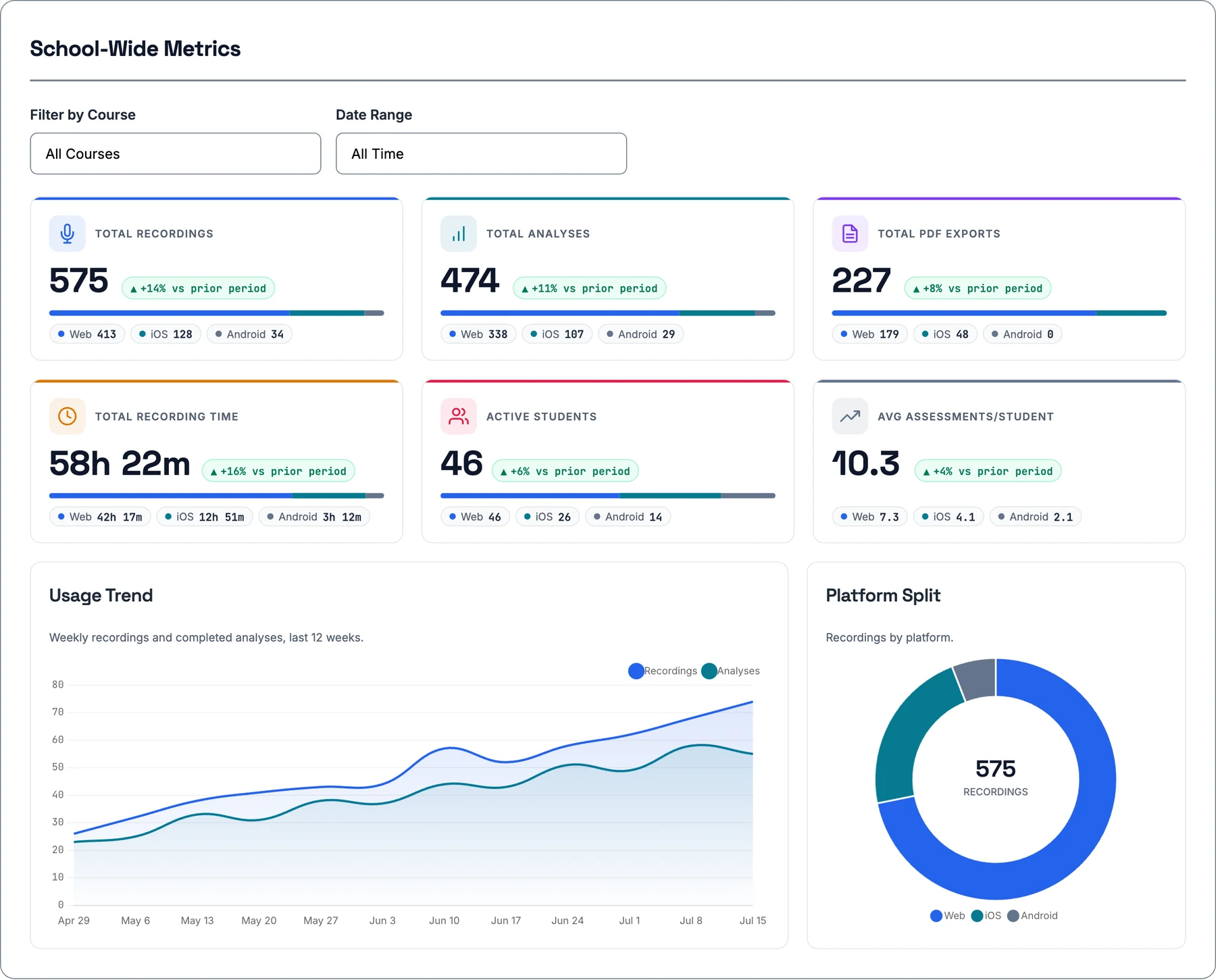
Track adoption, engagement, and outcomes across your entire program. Spot at-risk students early.
Group scenario assessment
Teams recorded together and transcribed as individual speakers on one scenario, graded as a single shared score instead of one student at a time.
Student video upload
Add a "Student uploads a video" activity to an assignment: a conversation, a procedure, or both. Each student uploads one video on the web and gets AI feedback, advisory, with a conversation score and, if you attach skills, skills coaching. You can reset an upload so the student can upload once more.
Live in minutes. Not months.
No complex implementation or lengthy onboarding. Set up your course, connect your LMS, and start assessing the same day.
Canvas / Brightspace / Moodle / Schoology / Blackboard
- 05.1Course and assignment setup: create a course, pull its objectives and AACN codes from your syllabus, and set up the assignments students will record
- 05.2Your rubrics and skills: write or upload your own rubric and assign it to a course, and build custom video skills checks from your own checklist, including a PDF or Word file
- 05.3LMS import: bring in a course and its roster from any LMS, and add NurseKind assignments from inside your LMS
- 05.4Roster and grade sync: class lists stay in step with your LMS, and scores go back to its grade book
- 05.5No LMS yet? Upload a roster as a CSV
Ready for your IT and compliance review
Built for real clinical environments where patient information may be present: the answers your security team will ask for, up front.
HIPAA compliant
Deployable in active clinical placements. Business Associate Agreement (BAA) available for programs in clinical settings.
FERPA compliant
Meets federal requirements for educational records. Students can download their records, see who accessed them and request corrections in the app, and records are deleted after one year. Student data stays under your institution's control.
Encrypted end to end
All recordings and transcripts are encrypted in transit and at rest, with role-based access controls and audit logging.
Your data, your rules
Institutions own their data. Clear retention policies, MFA for faculty and admins, and documentation for security review.
Start with a pilot. Scale with your program.
No hidden fees. AI Patient Simulation is included in every institutional plan. Video review is its own tier.
Pilot Program
Test it with one cohort before full adoption
- Up to 100 uses in total: every recording, AI Practice session, and skills check counts
- AI Practice: 5 sessions per person during the pilot
- Unlimited faculty
- Full feature access, incl. AI Patient Simulation
- Web & mobile apps
- Implementation support & training materials
Institutional
The communication standard, program-wide
- Unlimited assessments & faculty
- AI Patient Simulation included
- LMS integration: Canvas, Brightspace, Moodle, Schoology and Blackboard, with course import, roster sync, and grades to your grade book
- Student & school usage reports
- Dedicated training & priority support
Complete
Institutional, plus video
- Everything in Institutional
- Video upload
- Timestamped observed behaviors
- Skills checks, incl. your own
- Faculty review flagged moments
- AI advises, faculty decide
Questions about procurement, quotes, or multi-campus pricing? Talk to us. We work with institutional purchasing processes every week.
What deans and directors ask us
Student & Faculty Access
Sign in to take an assessment, track your progress, or view your dashboard.
Watch a real encounter become an AACN evidence record
See a live assessment run on a real interaction, scored against AACN Essentials competencies and NCSBN CJMM, and bring your own rubric if you'd like.
20 minutes · see your own rubric scored live